
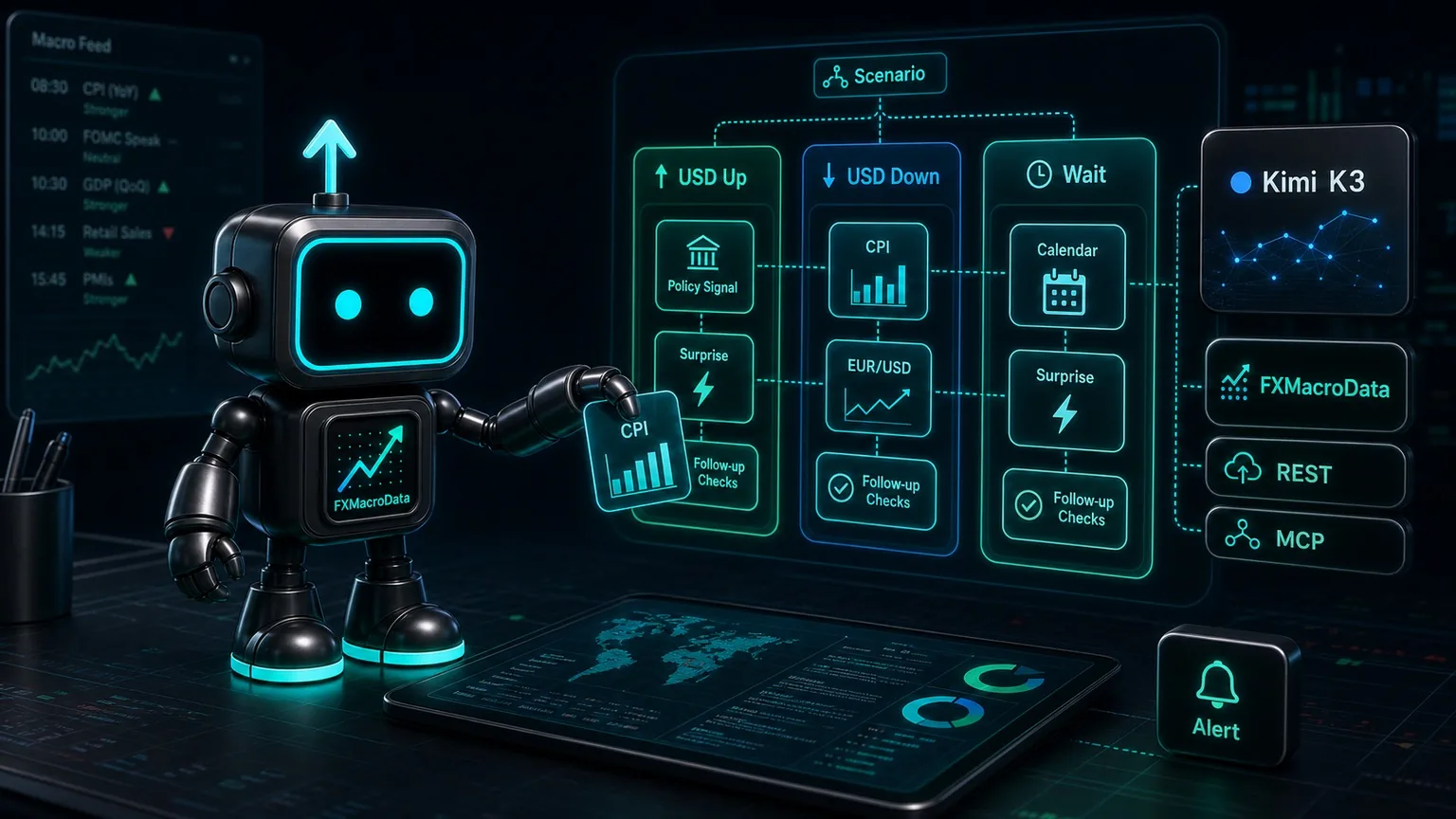
Moonshot AI's Kimi has become a serious topic for trading teams because the Kimi K3 release moves the open-weight AI debate from model benchmarks into agent workflows. TechCrunch framed the launch as another flashpoint in the global AI race: an open model from China, strong independent benchmark chatter, and immediate market concern around AI infrastructure stocks.
For traders, the opportunity is practical: Kimi can keep a large macro context open while calling tools for current facts, comparing scenarios, and drafting a research note a desk can act on. The model handles synthesis; FXMacroData supplies the release-aware evidence.
FXMacroData is that data layer for FX macro workflows: release calendars, announcement history, EUR/USD context, FX sessions, COT positioning, commodities, and source-labelled macro rows that Kimi should retrieve before it explains a setup.
Fit
Use this for
Pre-release macro briefings, release monitoring, model-assisted event reviews, scenario notes, and research assistants.
Kimi works best when
The AI-facing workflow starts with FXMacroData MCP, retrieves current evidence, and validates the output before a trader sees it.
Hand off to
Trader review, risk checks, and the desk's existing order workflow after the research brief is validated.
Why Kimi Matters for Trading Research
Kimi K3 is relevant to trading teams because Moonshot describes it as a long-horizon, agentic model with a 1 million token context window, native visual understanding, OpenAI-compatible API access, and tool-calling support. That is the right shape for research work: large document sets, event calendars, historical rows, prompt memory, and structured tool results.
Macro trading is full of context-heavy questions. A trader may ask why US CPI matters for EUR/USD, whether the next policy rate meeting has a clean setup, or how the Federal Reserve tone compares with the last decision. Kimi can help assemble and explain that context when the workflow gives it current release data to work with.
What Changes for the Trading Desk
The practical value is not that a desk can ask another chatbot for a view. The value is that a Kimi-backed workflow can keep a large macro context open while it checks fresh release data, compares scenarios, and writes a short note that a trader can audit quickly.
That changes the desk process. Instead of asking, "What do you think about EUR/USD?", ask Kimi to retrieve specific evidence first: the next USD release calendar row, the latest inflation prints, recent EUR/USD data, and any missing-data caveats. The answer should show facts, interpretation, and risk flags separately.
Desk scenario
A strategist asks, "What would invalidate our EUR/USD bias before New York opens?" The app retrieves USD calendar rows, recent inflation history, and current pair context from FXMacroData, then Kimi turns that evidence into bullish USD, bearish USD, and wait-for-confirmation scenarios.
Workflow Shape
1. Ask
The trader asks for release risk, pair context, central-bank setup, or scenario analysis.
2. Retrieve
The assistant discovers FXMacroData MCP tools for macro rows, event timing, FX context, and source fields.
3. Reason
Kimi writes the explanation, compares scenarios, and identifies uncertainty.
4. Review
Software and humans check evidence, timestamps, missing data, and risk flags.
MCP, Kimi Tool Calls, REST, or Dashboard Handoff?
Kimi and FXMacroData can be combined through several routes. For AI-facing workflows, make MCP the default because the assistant gets a discoverable, tool-shaped macro surface. REST remains important for app-owned services, caches, validation layers, and hosts that cannot use MCP.
| Route | Use it when | Why it matters |
|---|---|---|
| FXMacroData MCP | The surrounding assistant or agent host supports remote MCP servers. | This is the first AI-facing route: use https://mcp.fxmacrodata.com for discoverable hosted macro tools. |
| Kimi tool calls | You are using the raw Kimi API or an application host without direct MCP support. | Expose narrow functions that mirror the MCP evidence flow instead of giving the model broad URL access. |
| FXMacroData REST | Your app owns credentials, caching, validation, audit records, or non-MCP infrastructure. | This is the server-side fallback and implementation layer around the MCP-first AI workflow. |
| Dashboard handoff | A human needs to inspect charts or event context visually. | Send the reader to the pair dashboard, release calendar, or sessions page. |
Step 1: Connect FXMacroData MCP
What to do: connect Kimi to the hosted FXMacroData MCP server before asking it for current macro facts. That makes the release, FX, and calendar tools discoverable to the AI workflow before any prose is written.
Register the hosted server from Kimi Code CLI
Kimi Code CLI, which is evolving into Kimi Code, can register an HTTP MCP server directly from the terminal. Add FXMacroData with a local name, then confirm that Kimi can see it:
kimi mcp add --transport http fxmacrodata https://mcp.fxmacrodata.com
kimi mcp list
The name fxmacrodata is only the local server label. For public USD macro research, this connection does not require an API key. Once kimi mcp list shows the server, start with a retrieval-first request such as:
Use data_catalogue to confirm USD inflation coverage, then retrieve recent USD inflation and the USD release calendar. Separate facts from interpretation.This keeps current macro facts in FXMacroData rather than in a copied prompt or model memory. It also gives Kimi the hosted MCP tool surface, which is the right default for a terminal-based research workflow.
Registers the MCP server and receives the question.
Exposes current macro, calendar, and FX tools.
Separates facts, interpretation, and risk flags.
Use the same hosted endpoint from another MCP-capable Kimi host
The hosted FXMacroData MCP endpoint is:
https://mcp.fxmacrodata.com
https://mcp.fxmacrodata.com?api_key=YOUR_API_KEY
Start with a short allowed-tool list for trading research: data_catalogue, indicator_query, release_calendar, and forex. Add COT, commodities, and central-bank news after the basic evidence loop is reliable.
Step 2: Add REST for App-Owned Fallbacks
What to do: keep a small server-side helper for applications that need direct FXMacroData REST calls, local caching, audit records, or hosts that cannot call MCP directly. Keep API keys out of model-visible prompts and browser-visible code.
import os
import requests

API_ROOT = "https://api.fxmacrodata.com/v1"

def fxmd_get(path: str, **params) -> dict:
    params["api_key"] = os.environ["FXMD_API_KEY"]
    response = requests.get(f"{API_ROOT}{path}", params=params, timeout=20)
    response.raise_for_status()
    return {"source": f"/v1{path}", "payload": response.json()}
Use production endpoint examples with query-parameter authentication:
curl "https://api.fxmacrodata.com/v1/calendar/usd?api_key=YOUR_API_KEY"
curl "https://api.fxmacrodata.com/v1/announcements/usd/inflation?api_key=YOUR_API_KEY"
curl "https://api.fxmacrodata.com/v1/forex/eur/usd?api_key=YOUR_API_KEY"
For a fallback Kimi workflow, expose a single briefing context instead of giving the model arbitrary URL access.
def eur_usd_cpi_briefing_context() -> dict:
    return {
        "usd_calendar": fxmd_get("/calendar/usd", indicator="inflation"),
        "usd_inflation": fxmd_get("/announcements/usd/inflation", limit=6),
        "eur_usd": fxmd_get("/forex/eur/usd", limit=30),
    }
Step 3: Use Kimi Tool Calls When Needed
When the raw Kimi API is running outside an MCP-capable host, keep the same MCP-first shape by exposing a narrow evidence function. Kimi's API is OpenAI-format compatible, so the same broad function-tool pattern applies: define a JSON Schema tool, pass it to Kimi, execute the requested function in your application, then send the result back for the final answer.
from openai import OpenAI

client = OpenAI(
    api_key=os.environ["MOONSHOT_API_KEY"],
    base_url="https://api.moonshot.ai/v1",
)

tools = [{
    "type": "function",
    "function": {
        "name": "eur_usd_cpi_briefing_context",
        "description": "Return USD CPI calendar, recent USD inflation, and EUR/USD context.",
        "parameters": {"type": "object", "properties": {}},
    },
}]
Then ask Kimi a question that requires evidence retrieval:
response = client.chat.completions.create(
    model="kimi-k3",
    messages=[{
        "role": "user",
        "content": "Build a pre-release EUR/USD note for the next USD CPI event."
    }],
    tools=tools,
    reasoning_effort="max",
)
Treat the first response as the tool-planning step. If Kimi returns a tool call, your server runs the matching FXMacroData helper, sends the result back as the tool message, and asks for the final answer with explicit output requirements.
Step 4: Require Reviewable Output
A trading desk needs a result it can scan quickly. Ask Kimi for a structured result that separates current facts from interpretation.
{
  "facts": ["Latest USD CPI rows came from /v1/announcements/usd/inflation"],
  "calendar": ["Next USD inflation event came from /v1/calendar/usd"],
  "interpretation": "EUR/USD risk is concentrated before the release window.",
  "missing_data": [],
  "risk_flags": ["human_review_required", "source_paths_required"]
}
Review checklist
- Does the answer name the FXMacroData MCP tools or fallback paths used?
- Does it preserve event timing, latest rows, and missing-data caveats?
- Does it separate evidence from market interpretation?
- Does it make the handoff point clear for trader review and risk workflow?
Prompt Kimi Like a Macro Research Agent
Kimi's own K3 notes call out long-horizon agentic behavior. In trading, that is most useful when the prompt turns the model into a disciplined macro analyst: retrieve the data, preserve the evidence, compare scenarios, and hand back a brief a trader can review.
You are an FX macro research assistant.
Use FXMacroData MCP tools before answering current macro questions.
Preserve source paths, announcement timing, and missing-data caveats.
Separate evidence, interpretation, scenarios, and risk flags.
Return a concise brief for the user's trading workflow.
A good user prompt forces retrieval and reviewable output:
Build a pre-release EUR/USD briefing for the next USD CPI event.
Use FXMacroData MCP to retrieve the USD release calendar, recent USD inflation rows, and EUR/USD context.
Return bullish USD, bearish USD, and no-trade scenarios with evidence paths.
Desk Workflow Controls
| Control | What it keeps clean | Practical rule |
|---|---|---|
| Scoped data tools | The model stays focused on the macro evidence task. | Start with MCP release, FX, and calendar tools before expanding workflow actions. |
| Known-at-time discipline | Event reviews keep pre-release and post-release evidence separate. | Preserve release timestamps and source fields in the answer. |
| Schema validation | A malformed model answer enters a downstream workflow. | Reject output missing evidence, source paths, gaps, or risk flags. |
| Workflow scope | An agent improvises beyond the task. | State the allowed tools, output fields, and handoff requirements. |
| Desk handoff | Research output stays distinct from downstream trade decisions. | Route the briefing to a trader or analyst before it enters the desk workflow. |
What to Measure After Launch
Evaluate Kimi like a research process, not like a demo. The model is useful if it retrieves the correct evidence, keeps current facts separate from interpretation, admits uncertainty, and produces a brief that a trader can check quickly.
| Measure | Good sign | Warning sign |
|---|---|---|
| Evidence use | The answer cites FXMacroData paths and preserves current rows. | The answer has no source paths or current data rows. |
| Scenario quality | The brief separates bullish, bearish, and no-trade cases. | The answer collapses every setup into a single directional view. |
| Operational discipline | The evidence and scenario fields are complete before the brief is handed off. | The brief jumps from narrative straight to order instructions. |
Common Questions
Can Kimi be used for trading?
Yes. Kimi is well suited to macro research, monitoring, and explanation because it can keep a large context window open, call tools, compare release scenarios, and produce structured briefings.
Should Kimi use MCP or REST with FXMacroData?
Use FXMacroData MCP first for AI-facing workflows. Use REST behind the application when a host cannot call MCP directly, or when the product needs server-side caching, validation, audit records, or a non-MCP integration path.
Why not let Kimi rely on model memory?
Trading research needs current releases, exact event timing, source paths, and missing-data caveats. Model memory can be stale or incomplete, so current macro facts should come from FXMacroData.
What is a good first Kimi FX workflow?
Start with a pre-release briefing workflow: retrieve the next calendar event, recent announcement history, and pair context, then ask Kimi for scenarios, confidence drivers, and follow-up checks.
Related FXMacroData guides
- AI Trading hub — explore FXMacroData workflows for research agents and trading teams.
- Using Llama for Trading: FX Macro Agents with REST and MCP
- How to Use OpenRouter with FXMacroData for AI Trading Agents
- How to Use OpenAI Agents SDK with FXMacroData for FX Trading
- FXMacroData MCP server documentation
Sources
This guide uses public documentation and reporting. It is educational engineering content, not investment advice or a recommendation to trade any instrument.
Bottom Line
Kimi is interesting for trading because it can hold more context, call tools, and write structured reasoning. Paired with FXMacroData, that becomes a practical way to turn macro releases and FX context into desk-ready scenarios.
The reliable pattern is Kimi plus FXMacroData for grounded macro research, MCP-first tool access for AI interaction, REST as the app-owned fallback layer, and deterministic controls for validation and handoff. That gives a trading team the useful part of agentic AI while keeping the evidence trail clear.
